Why Is My Business Not Showing on Google?
Business not showing on Google or Google Maps? Check these 9 common reasons, from an unverified profile to a blocked website, and fix each one step by step.

Sambhav Shah
Guest author, Digital Aura
Ahmedabad, Gujarat
Part of our complete guide: How to Become an SEO Expert in 2026: A 7-Step Practical Roadmap
Table of Contents
- 1First, Check How You Are Searching
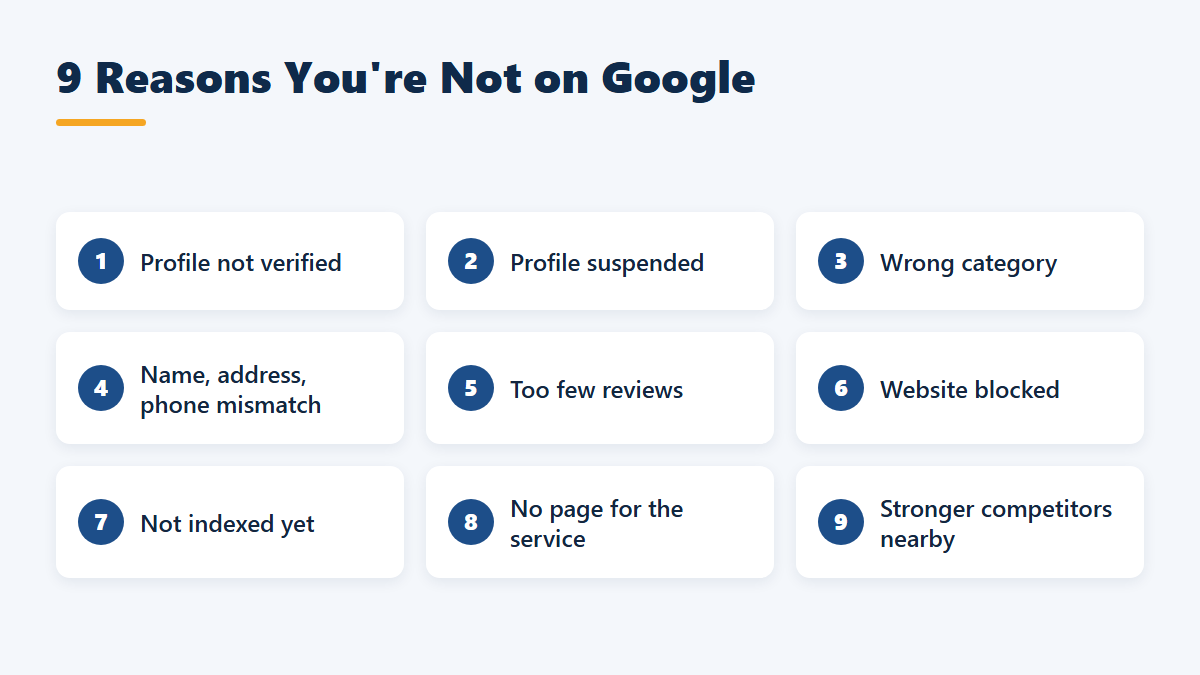
- 29 Reasons Your Business Is Not Showing on Google (and How to Fix Each)
- Reason 1: Your Google Business Profile Is Not Verified
- Reason 2: Your Profile Has Been Suspended
- Reason 3: Wrong or Too-General Category
- Reason 4: Name, Address and Phone Don't Match Everywhere
- Reason 5: Too Few Reviews, or No Recent Ones
- Reason 6: Your Website Is Blocked From Google
- Reason 7: Your New Website Is Not Indexed Yet
- Reason 8: You Have No Page for the Service People Search
- Reason 9: Stronger Competitors Are Closer to the Searcher
- 3How to Show My Business on Google: Quick Start for New Businesses
- 4Not Showing on Google After Verification?
- 5How to Check Your Website in Google Search Console (Free)
- 6When to Get Expert Help
- 7Frequently Asked Questions About Showing Up on Google
- 8The Bottom Line: There Is Almost Always a Fixable Reason
Part of our complete guide: 5 Proven Tips to Improve Your Local SEO in 2026: Complete Guide for Indian Businesses
⚡ Quick Answer
Why is my business not showing on Google? The most common reasons are: your Google Business Profile is not verified or has been suspended, the category is wrong, your name, address and phone number don't match across the internet, you have few reviews, your website is blocked from Google or not yet indexed, you have no page for the service people search, or stronger competitors are closer to the searcher. Each one can be checked for free and most can be fixed in a few days.
Few things are as frustrating for a business owner as searching for your own business on Google and not finding it. Customers tell you they "couldn't find you online". Competitors with fewer years in business appear on the map, and you don't.
The good news: in most cases there is a clear reason, and you can find it yourself. This guide walks you through the checks, from the quickest to the most technical, with the fix for each.
First, Check How You Are Searching
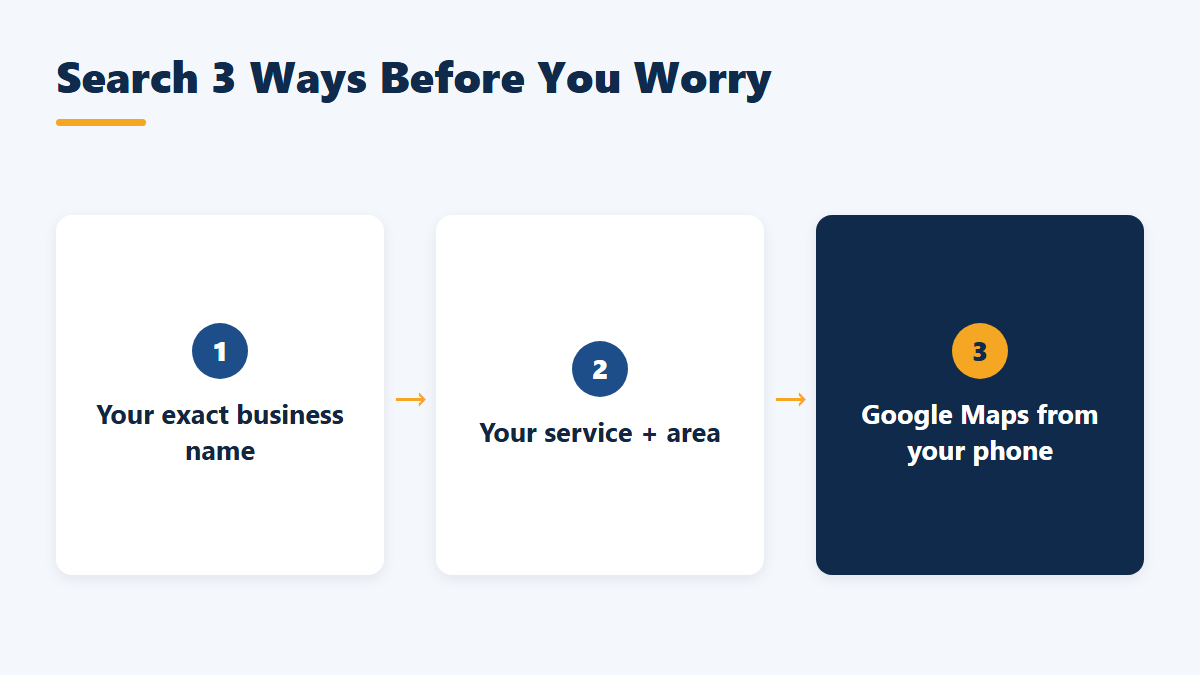
Google shows different results to different people, based on where they are and what they searched before. Before you worry, search three ways:
- Your exact business name (for example "Shree Krishna Dental Clinic"). If you don't appear even for your name, the problem is usually the Google Business Profile or the website being blocked.
- Your service plus area (for example "dental clinic in Naranpura"). If you appear for your name but not here, the problem is relevance, reviews or competition.
- On Google Maps, from a phone, near your shop or office.
💡 Use a Private Window
Search in a private (incognito) window, or ask a friend in another area to search. Your own searches can show your business more often than other people see it.
9 Reasons Your Business Is Not Showing on Google (and How to Fix Each)
Reason 1: Your Google Business Profile Is Not Verified
An unverified profile usually does not appear on Maps or in local results. Sign in at business.google.com and check for a "Verify" or "Get verified" message. Complete the verification Google offers (video, phone, SMS or email, depending on your business).
Reason 2: Your Profile Has Been Suspended
Google suspends profiles that break its rules. Common causes in India: adding keywords to the business name (for example "Patel Dental Clinic Best Dentist in Ahmedabad"), using a virtual office or a co-working desk as the address, or creating more than one profile for the same location.
Fix: correct the problem first, then submit a reinstatement request from the profile with proof (shop photos, a utility bill, a GST certificate).
⚠️ Don't Stuff Keywords Into Your Business Name
Your Google profile name must match your real signboard and documents. Adding "best", city names or services to the name is one of the most common reasons for suspension.
Reason 3: Wrong or Too-General Category
The primary category tells Google what you are. A clinic listed as "Medical Centre" instead of "Dentist", or a manufacturer listed as "Company", will struggle for specific searches. Choose the most specific primary category, then add up to a few secondary categories for other services.
Reason 4: Name, Address and Phone Don't Match Everywhere
Google compares your details across your website, Google profile, Facebook, JustDial, IndiaMART and other directories. If the address is written differently, an old phone number is still listed, or the shop has moved, Google trusts the listing less. Make the name, address and phone number (often called NAP) exactly the same everywhere.
Reason 5: Too Few Reviews, or No Recent Ones
Reviews are one of the strongest local signals. A profile with five reviews from 2022 will rarely beat a nearby competitor with 200 recent reviews. Ask every happy customer for a review, share your direct review link on WhatsApp, and reply to every review, good or bad.
For more on why this matters, see our guide on the 10 real benefits of local SEO.
Reason 6: Your Website Is Blocked From Google
This is more common than most owners think, especially after a new website is launched. The developer may leave a setting that tells Google not to show the site. On WordPress it is the "Discourage search engines from indexing this site" box under Settings → Reading. On other websites, it can be a "noindex" tag or a robots.txt rule.
Quick check: search Google for site:yourwebsite.com. If no pages appear, Google is not showing your website at all.
Reason 7: Your New Website Is Not Indexed Yet
A new website can take days or weeks before Google finds it. Speed this up by adding the site to Google Search Console (free), submitting your sitemap, and using the "URL Inspection" tool to request indexing for your main pages.
Reason 8: You Have No Page for the Service People Search
If you offer five services but your website has only a home page that lists them, Google has little to rank for each one. A clinic that wants to show up for "root canal treatment in Vastrapur" needs a page about root canal treatment. Create one clear page for each main service, with prices or price ranges, photos, FAQs and a contact button.
Reason 9: Stronger Competitors Are Closer to the Searcher
On Google Maps, distance matters. If someone searches from Bopal and you are in Maninagar, nearby businesses will usually appear first. You cannot change distance, but you can win more searches by building stronger reviews, adding area pages to your website for the areas you serve, and keeping your profile active with photos and posts.
| Reason | How to check | Fix | Time to see change |
|---|---|---|---|
| Profile not verified | business.google.com | Complete verification | Days |
| Profile suspended | Warning on the profile | Fix the cause, request reinstatement | Days to weeks |
| Wrong category | Profile → Edit profile | Choose a specific primary category | 1–4 weeks |
| NAP mismatch | Search your phone number on Google | Make details identical everywhere | 1–3 months |
| Few reviews | Compare with the top 3 on the map | Ask every happy customer | Ongoing |
| Website blocked | Search site:yourwebsite.com | Remove noindex / robots block | Days to weeks |
| Not indexed | Google Search Console | Submit sitemap, request indexing | Days to weeks |
| No service page | Look at your website menu | One page per main service | 1–3 months |
| Distance and competition | Search from different areas | Reviews, area pages, regular updates | 2–6 months |
How to Show My Business on Google: Quick Start for New Businesses
Many new owners search "how to get my business on Google Maps" or "how to show my business on Google" for the first time. The steps are simple:
- Create a free Google Business Profile at business.google.com with your exact business name, address and phone number.
- Choose the most specific category and complete the verification Google offers.
- Add your services, opening hours, photos and website link.
- Add your website to Google Search Console and submit the sitemap.
- Ask your first customers for reviews.
Not Showing on Google After Verification?
Verification does not mean instant visibility. After verification, it can take from a few days to a few weeks before the profile appears for searches other than your name. If it still does not appear after a few weeks, check for a suspension message, a duplicate profile for the same address, or a category that is too broad.
How to Check Your Website in Google Search Console (Free)
- Go to search.google.com/search-console and add your website.
- Verify ownership (your developer can do this in a few minutes).
- Open Pages to see which pages Google has indexed and which it has not, with the reason.
- Open Sitemaps and submit your sitemap (often yourwebsite.com/sitemap.xml).
- Use URL Inspection on your home page and main service pages, and click "Request indexing" if needed.
Learn Local SEO Step by Step
Upmark's AI SEO Course covers Google Business Profile, local keywords, citations, reviews and Search Console with live practice, useful for owners and in-house teams.
Book Free Demo Class →When to Get Expert Help
Most of the checks above you can do yourself. Get expert help when:
- Your profile is suspended and the reinstatement request was rejected.
- There are duplicate profiles you cannot remove.
- You suddenly disappeared after appearing for months.
- You have fixed the basics and nothing has changed after 8–10 weeks.
📍 Getting Expert Help in Ahmedabad
Digital Aura, which provides local SEO services in Ahmedabad, offers a free SEO audit that covers these checks and more: a technical SEO review, keyword gaps, competitor analysis, a Google Search Console review and a growth roadmap. A senior SEO expert reviews it personally and delivers it within 48 hours. Whoever you work with, ask for a written list of findings before you agree to any monthly plan.
Frequently Asked Questions About Showing Up on Google
Why is my business not showing on Google Maps?
The most common reasons are an unverified or suspended profile, a wrong primary category, very few reviews, or stronger competitors closer to the person searching. Start by searching your exact business name on Maps from a private window.
Why is my business not showing up on Google after verification?
It can take from a few days to a few weeks after verification. If it still does not show, check for a suspension notice, a duplicate profile or a category that is too general.
Why is my website not showing up on Google?
Search site:yourwebsite.com. If nothing appears, the site may be blocked (noindex or robots.txt) or not yet indexed. Add it to Google Search Console and submit your sitemap.
Does posting on Google Business Profile help?
Regular posts and new photos show Google the business is active and give customers more reasons to call. They help most when the basics (category, reviews, correct details) are already right.
How long does it take to appear on Google?
Simple fixes like verification or removing a block can show results within days. Ranking for competitive searches like "dentist near me" usually takes 2–6 months of steady work.
Google Business Profile not showing up in search: what should I check first?
Search your exact business name in a private window. If it still does not appear, check that the profile is verified, not suspended, and that there is no duplicate profile for the same address.
Verified business not showing on Google Maps: why does this happen?
Verification only confirms you own the business. Google may still show nearby competitors first because of distance, reviews and category. Check the category, add photos and services, and build reviews.
Why is Google My Business not showing on Maps after I edited it?
Big edits, such as a new name, address or category, are reviewed by Google and can trigger re-verification. Look for an "under review" or "verify" message in the profile.
The Bottom Line: There Is Almost Always a Fixable Reason
If your business is not showing on Google, it is rarely bad luck. Work through the nine reasons in order: verification, suspension, category, details, reviews, website blocks, indexing, service pages and competition. Most businesses find the problem within the first five checks.
Fix the basics first, then build reviews and service pages steadily. That is what moves a business from invisible to being the one customers call.
Master Local SEO With Upmark
Learn how to get businesses onto Google Maps and keep them there, with Upmark's AI SEO Course.
Book Free Demo Class →About the author
This article was contributed by Sambhav Shah of Digital Aura, a digital marketing and SEO agency in Ahmedabad that has worked with 120+ businesses in India and abroad.
Guest Author
Sambhav Shah
Guest author, Digital Aura
Sambhav didn't learn digital marketing in a classroom. Starting in 2015, he built his expertise the hard way: self-taught and hands-on, scaling teams and driving growth across industries for over a decade. He has led business development, managed client relationships across continents, built and mentored growing teams, and worn every hat a high-performance agency demands. With 10+ years of cross-functional experience in client acquisition, team leadership and digital execution, he is personally involved in strategy, whether it is an AI automation system, a performance campaign targeting international markets, or a web platform built to convert. This article was contributed as a guest post; the views and results described are the author's own.
Found this useful? Share it
Free Demo Class
Ready to turn this knowledge into a career?
Live projects, AI tools & placement support from Ahmedabad's top digital marketing institute.